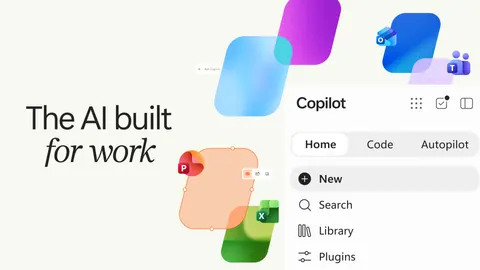
Microsoft Unveils Next-Gen Copilot: Building an 'AI Operating System' for Knowledge Work
Microsoft has aggressively expanded its Copilot ecosystem, positioning the platform as a de facto AI Operating System for enterprise knowledge work. By unifying conversational chat, native Office collaboration, low-code tool generation, and long-running autonomous agents into a single surface area, the company is shifting the paradigm from generating text responses to delivering persistent business outcomes.
This architectural review breaks down the core components, runtime mechanics, pricing dependencies, and practical enterprise trade-offs of the next-generation Copilot.
1. Core Architecture & Experience Surface
The next-gen Copilot merges disparate productivity loops into an integrated command center. The user experience is anchored by three primary modalities operating over a unified enterprise context layer (Microsoft IQ):
+-----------------------------------------------------------------+
|                         Microsoft IQ                            |
|             (Enterprise Knowledge, Graph & Context)             |
+-----------------------------------------------------------------+
                                  |
        +-------------------------+-------------------------+
        |                         |                         |
        v                         v                         v
   [ Home / Chat ]         [ Cowork / Code ]          [ Autopilot ]
   - Ad-hoc Q&A            - Complex Artifacts        - Autonomous Agents
   - Instant Iteration     - Dynamic App Gen          - Cross-Day Workflows
        |                         |                         |
        +-------------------------+-------------------------+
                                  |
                                  v
+-----------------------------------------------------------------+
|                    Copilot Managed Runtime                      |
|         (Sandboxed Execution, RBAC, Data Connectors)            |
+-----------------------------------------------------------------+
Home: Unified Entry Point
- Chat: Optimized for transactional, synchronous Q&A, drafting, and rapid query-response loops where human-in-the-loop (HITL) direction remains constant.
- Cowork: Designed for multi-step, asynchronous delegation (e.g., RFP responses, financial close packages, or product launch briefs). The user defines the objective; Cowork orchestrates the retrieval, synthesis, and iterative generation of a finalized deliverable.
- Office in Copilot: Generative outputs bypass isolated chat windows, injecting directly into live, collaborative Word, Excel, and PowerPoint documents via native co-authoring (
@mentions, real-time state sync, brand-aligned template rendering).
2. Technical Highlights & Feature Breakdown
Code: Natural Language Micro-App Generation
Beyond static documents and spreadsheets, Microsoft is introducing Code, allowing business users to generate functional micro-applications using natural language prompts. * Capabilities: Generates interactive dashboards, kanban trackers, desktop widgets, and internal utilities. * Underlying Tech: Built on the same underlying infrastructure as GitHub Copilot, but targeted at business users via the broader Microsoft 365 governance layer. * Execution Flow: A user requests a “sales pipeline kanban broken down by region and stage.” Copilot builds the UI, connects it to enterprise data sources via plugins, and renders it as a shareable, cloud-hosted component.
Autopilot: Persistent, Autonomous Agents
Formerly codenamed Scout, Autopilot transitions the AI paradigm from reactive querying to persistent background execution. * Architecture: Each Autopilot agent is provisioned with a distinct identity, working memory, sandbox environment, and workspace. * Execution Loop: Capable of monitoring Teams channels, tracking discussions, executing cron-like periodic routines, and driving multi-day workflows (e.g., end-to-end vendor review cycles) without requiring constant re-prompting. * Governance: Integrated with role-based access control (RBAC) and audit logs to track agent actions, data access boundaries, and cross-system mutations.
3. Infrastructure, Runtime & Economic Model
Moving from prompt-response text generation to stateful applications and autonomous agents introduces significant infrastructure and operational overhead.
Copilot Managed Runtime
To bridge the gap between "code generation" and "production execution," Microsoft introduced the Copilot Managed Runtime: * Sandboxing: Generated apps and agent routines execute within isolated, tenant-bound sandboxes to prevent memory leaks, execution deadlocks, or privilege escalation. * Data Integration: Leverages Microsoft IQ and extensibility plugins to query real-time enterprise data while respecting existing security perimeters. * Extensibility: Open to third-party developers and Copilot Studio builders, establishing a standardized runtime layer for enterprise AI apps.
Consumption-Based Pricing & Billing Mechanics
The platform decouples standard conversational usage from intensive background tasks: * Subscription Tier: Covers baseline daily chat, search, and standard Office Copilot interactions. * Metered Consumption: Advanced capabilities—specifically Cowork, Code, and Autopilot—draw from dedicated usage pools billed on consumption metrics. * Enterprise Controls: IT administrators must explicitly provision budget caps, spending policies, and resource quotas to prevent uncontrolled background API consumption.
4. Practical Trade-offs & Rollout Status
While the architectural vision establishes a compelling blueprint for an AI operating system, enterprise deployment requires navigating distinct operational friction points:
| Capability | Current Release Status | Primary Architectural Dependency | Enterprise Risk / Consideration |
|---|---|---|---|
| Home / Chat | Generally Available (GA) | Microsoft Graph, M365 Copilot License | Hallucinations in unstructured data context. |
| Cowork / Office | Rolling out / Preview | Real-time Co-authoring Engine | Version collision and state synchronization overhead. |
| Code | Private Preview | Copilot Managed Runtime, Sandbox Isolation | Code quality, edge-case debugging for non-technical users. |
| Autopilot | Extended Private Preview | Dedicated Agent Identity, Microsoft IQ | Unmonitored state drift, permission boundaries, audit tracing. |
Architectural Verdict
Microsoft's next-generation Copilot is less of a feature update and more of an infrastructural consolidation. By standardizing execution environments, state management, and enterprise permissions under the Managed Runtime, Microsoft is attempting to solve the hardest problem in enterprise AI: moving past single-turn chat windows into reliable, stateful, and secure workflow automation.
Engineering Takeaway: Enterprises must audit their Microsoft Graph data hygiene, establish strict consumption quotas for metered workloads (Cowork/Code/Autopilot), and define explicit boundary policies before turning autonomous agents loose on production pipelines.