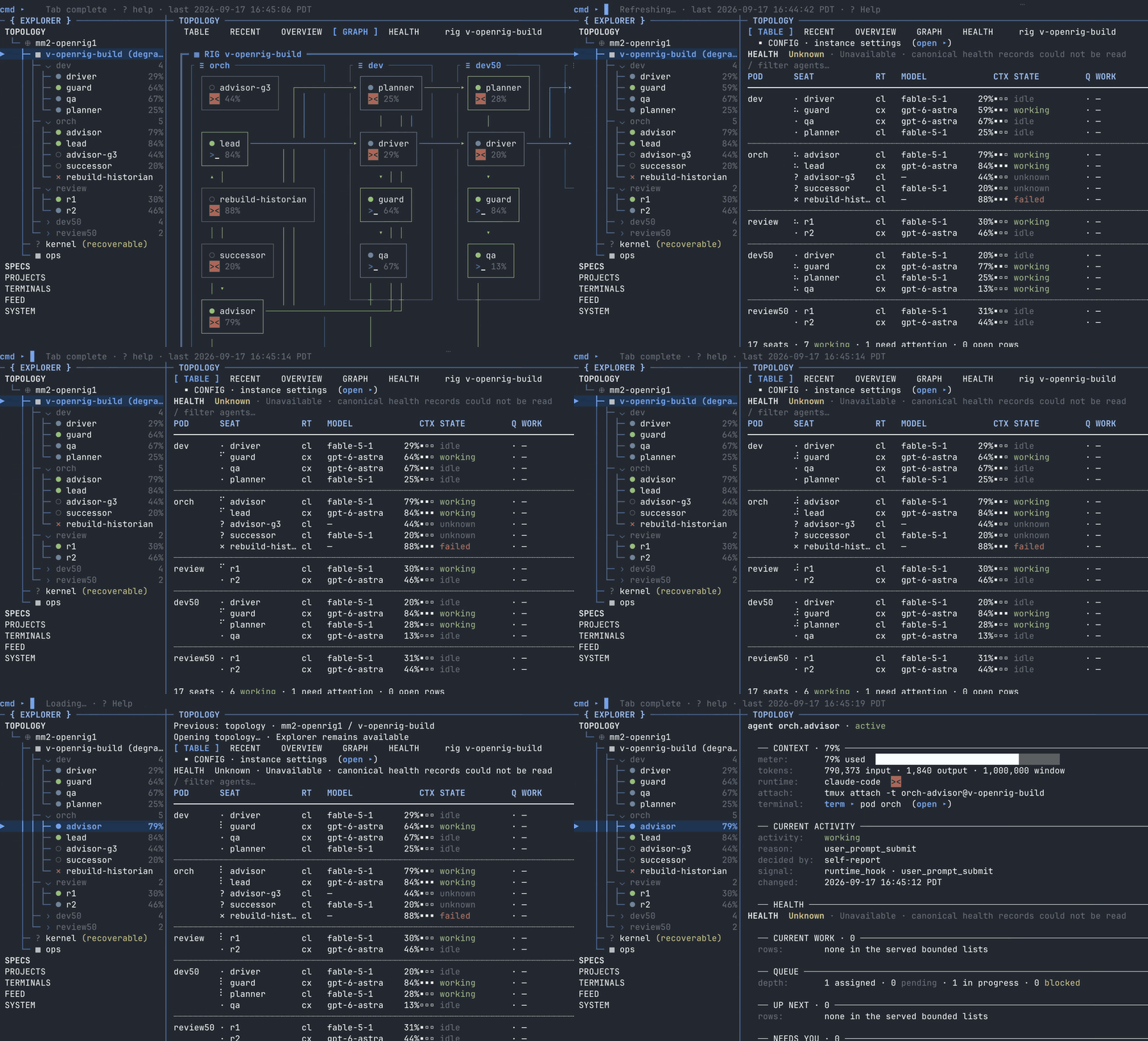
1. The Core Bottleneck: What Architectural Pain Point Does It Smash?
AI coding tools within standard terminal workflows are trapped in a severe fragmentation crisis. Developers frequently maintain multiple isolated terminal windows running Claude Code, Codex, and various independent agents concurrently. These sessions remain blind to each other's context, unable to hand off tasks or establish a closed-loop code review mechanism. As project complexity scales, the developer degrades into an inefficient manual message broker, copying and pasting logs, stack traces, and patch files across disconnected terminals.
OpenRig completely eliminates this manual stitching workflow. It deeply encapsulates underlying terminal multiplexers like tmux, SQLite instance state management, and unified provider hooks. By wrapping distinct agents into isolated harness abstractions and weaving multiple harnesses into a cohesive rig via YAML declarations, the system enables a lead agent to coordinate specialist agents across isolated workspaces, pushing changes in parallel and verifying exact candidates before merging.
💡 Core Architectural Insight: OpenRig does not invent a new LLM runtime. Instead, it reduces existing heterogeneous terminal tools into standardized engineering execution nodes, leveraging mature terminal multiplexing infrastructure to achieve a distributed multi-agent pipeline.
2. Core Architecture & Low-Level Data Flow Analysis
OpenRig's topology rests firmly upon host process boundaries and tmux session management. The system comprises a CLI control plane, a daemon controller, an SQLite state persistence layer, a tmux virtual terminal cluster, and model-specific harness wrappers. When a developer triggers a launch command, the control plane reads the YAML configuration, initializes local instance state, and pre-trusts the workspace.
[ rig CLI / User Prompt ] ---> [ Daemon Controller ] ---> [ SQLite Instance State ]
                                        │
                                        ▼
                         [ tmux Multiplexer Sessions ]
                                        │
            ┌───────────────────────────┴───────────────────────────┐
            ▼                                                       ▼
[ dev-owner (Claude Code) ]                         [ dev-check (Codex Checker) ]
            │                                                       │
            └───────────────> [ Local Workspace ] <─────────────────┘
During low-level execution, the daemon maintains instance lifecycles and configuration synchronization. When rig up executes, the system spawns corresponding tmux sessions and injects discovery skills into the agent's local directory. The lead owner agent receives a bounded business goal, executes modifications locally, records queue tasks, and hands off exact candidates to the checking agent for verification. All session outputs, states, and context collectors remain active in the background, allowing developers to inspect the live state via the shared dashboard (rig tui --shared) at any moment.
3. Technology Selection & Hardcore Matrix Comparison
| Evaluation Metric | This Solution (openrig) | Traditional Paradigm | Typical Competitor Solution | Production Yield |
|---|---|---|---|---|
| Multi-Agent Coordination | tmux session clusters with declarative YAML | Manual terminal window juggling | Cloud SaaS closed sandbox scheduling | Eliminates manual message overhead, achieves inline session sync |
| State Persistence | Local SQLite & ~/.openrig directory |
Relies on single-session volatile memory | Remote proprietary database black boxes | Full local data sovereignty, zero data leak risks |
| Heterogeneous Model Support | Native orchestration of Claude Code and Codex | Vendor-locked single ecosystem environments | Restricted to native platform-wrapped APIs | Freedom to mix top-tier coding agents, avoids lock-in |
| Environment Constraints | Requires Node.js 22 and tmux | Loose requirements, highly chaotic management | Requires dedicated container clusters | Zero heavy virtualization overhead, reuses host environment |
Architecturally, OpenRig adopts a rigorously restrained approach by embracing existing mature toolchains. It avoids rewriting terminal emulators or forcing heavy Docker containers, utilizing tmux as a process isolation sandbox and SQLite for atomic state persistence. This design maintains resource consumption on local developer workstations at minimal levels while preserving supreme system transparency.
4. Hands-On Geek Practical Guide: Building a Minimal Loop
Before launching, ensure Node.js 22 and tmux are installed on the host machine, and Codex is fully authenticated. Native Windows is unsupported; macOS or Linux environments are strictly recommended.
# Install the OpenRig CLI globally
npm install -g @openrig/cli

# Perform a dry-run setup check for tmux and cmux dependencies
rig setup --dry-run

# Verify core prerequisites and Codex authentication status
tmux -V
codex --version
codex login status

# Navigate to your target git repository
cd /path/to/your/repository

# Inspect the planned topology for your project rig
rig up first-project --cwd . --plan

# Boot the engineering rig named first-project
rig up first-project --cwd .

# Open the shared dashboard TUI to monitor agent runtime states
rig tui --shared
Once the team is active, issue bounded tasks to specific seats via the CLI. The command below instructs the owner agent to implement a specific change and assign verification to the checking agent:
rig send dev-owner@first-project 'Implement feature X. Track the task in the queue and return its ID. Keep it local, verify the behavior, ask dev-check@first-project to check the exact candidate, and record the result.'

# Inspect current queue status
rig queue list --destination dev-owner@first-project --limit 1000
5. Production Deployment Gotchas & Avoidance Strategies
Integrating OpenRig into high-intensity daily development workflows requires defending against specific side-effect behaviors in the underlying engine. Because the daemon writes workspace trust settings to ~/.claude.json and injects mouse support and scrollback rules into user tmux configurations during initialization, blind installation can inadvertently alter existing terminal personalizations.
⚠️ Gotcha Warning [Bun Package Manager Interception]: Installing via
bun add -g @openrig/climay cause Bun to block the package's postinstall script. This disables Node.js version checks and SQLite module validation, requiring manual environment verification after Bun-based installations.⚠️ Gotcha Warning [Workspace Pre-Trust and Permission Scope]: The built-in bootstrap does not automatically provision blanket allow rules for
rigcommands. Avoid granting agents unrestricted global OS execution privileges. Explicitly configure project-level or user-level security scopes prior to launch to prevent automated iterative scripts from compromising critical production files.
When multiple concurrent agents write modifications to the same codebase, rigorously partition boundaries between dev-owner and dev-check. Segment tasks into atomic unit changes and strictly rely on queue tracking for task IDs to harness multi-agent throughput while preserving codebase integrity.